Be our facebook's fan page!

Tuesday, November 8, 2011

How to Enable Panorama Mode in iOS 5 [Video]

We’ve created an easy to follow video tutorial that shows you how to add the hidden panorama mode to iOS 5′s Camera app.
You will need a jailbroken iOS 5 device in order to do it, and you will also need iFile if you want to follow this specific tutorial.
If you meet those prerequisites, step inside to see how to enable panorama mode on iOS 5…
Step 1: Open iFile and Navigate to /var/mobile/Library/Preferences
Step 2: Tap on com.apple.mobileslideshow.plist and select Property List Viewer
Step 3: Tap the ‘+’ button in the bottom right-hand corner
Step 4: In the name field type: EnableFirebreak. In the Type field select: Boolean
Step 5: Tap Create in the upper right-hand corner and turn the switch to “on for EnableFirebreak, then tap done.
Step 6: Exit iFile, and respring your device
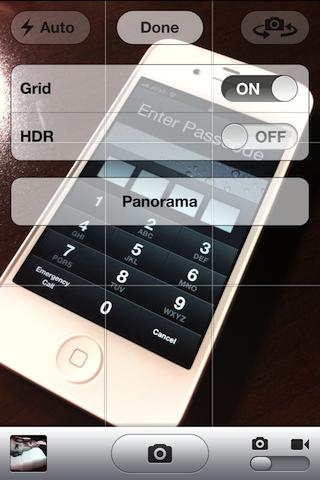
Step 7: Open the Camera app, tap options, and tap Panorama
Again, you will need a jailbroken device running iOS 5 to do this. You will also need a device with a built in gyroscope (iPhone 4, etc).
If you don’t feel like editing any plist values, then you can always wait until tomorrow now when Chpwn releases his Firebreak tweak that does the same thing.
Did it work for you? How do you like Panorama mode?
iDB

How To Launch Any App On iPhone 4S Using Siri

We all have done couple of tricks with Apple’s newly launched iPhone 4S Siri, and obviously asked couple of non-sense questions to check out its silliness. While Apple has baked it with a lot of potential features, but still it misses out many handy features. Some days ago, we have published a tip for Siri users, which allows them to directly tweet and update their Facebook status right from Siri panel. So far, we have tested couple things with Siri, but no one has yet come up with an idea to use Siri for opening third-party installed applications on the device.
Opening an application on iPhone 4S sounds really interesting, but anyone knows how is it possible? May be no one knows! If you don’t know, Apple has cool url based structure in its iOS core system that allow users or typically developers to launch their apps right from Safari by simply visiting the device URL. So in this trick, actually you have to read about your favorite apps internal URL system, and create some fake contact entries in iPhone 4S.
As we know, Siri can call anyone in your contact book, by simply calling the contact name. So all you have to do is create a contact with application URL, such as you can open Facebook for iPhone in Safari by visiting “fb://” on your device. Here is a list of some URL schemes: fb:// (Facebook), tweetbot://, reeder://, itms-apps:// (iTunes Music), maps://, sms:// (Messages), music://, youtube:// and itms-books:// (iBooks).
 
Alex of iDB explains this method working as:
To create a Facebook shortcut for Siri, make a new contact and name it something like “Facebook Shortcuts.” Then, add a bunch of the URL schemes from above. After you are done with it, tell Siri something along the lines of “show Facebook shortcuts.”

While using this method, you can at least get the application running on the device, but didn’t get any further access on device through Siri voice commands. Apple has not yet announced any feature of Siri which allow users to open or control any application using Siri API key.

Sunday, November 6, 2011

How To Root Motorola Droid RAZR On Android 2.3.5 Gingerbread [Tutorial]

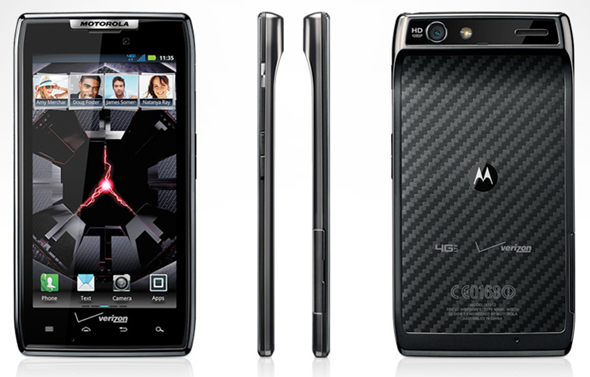
Motorola sure is quick with announcing new smartphones. We saw the Droid 3 and Droid BIONIC released recently and we are just a week away from the release of the Droid RAZRwhich is a high-end superphone exclusive to Verizon Wireless in the USA. Droid RAZR is just another Motorola phone which has been rooted before it has been released because it, apparently, is subject to the same exploit that was used to root Droid 3 and Droid BIONIC. We’ve got the step-by-step guide for your perusal after the break!
News of the root comes from Droid-Life – a blog dedicated to covering all things Android – in a post where they share a photo of rooted Droid RAZR with superuser (read: root) access.
The method for rooting the Droid RAZR is exactly the same as the method used to root Droid 3,Droid BIONIC and older phones like the Cliq and Cliq 2, Droid 2 Global, Droid X/X2 and Droid Pro. It is based on an exploit discovered by djrblissand the tool has been written byframework43/psouza4.
It is quite a simple procedure and, if you know how to work your way around a computer, you should be able to get your as-of-yet unreleased Droid RAZR without a hitch. Still, as with any hacking/rooting procedure, there are risks involved so you must consider them and proceed carefully.
How To Root Motorola Droid RAZR On Android 2.3.5 Gingerbread In One Click
DISCLAIMER: Redmond Pie is not to be held responsible for any loss of data as a result of the malfunctioning of your Motorola Droid RAZR.
Step 1: Download and install Motorola Drivers for your Windows PC (this doesn’t work on other operating systems): 32-bit or 64-bit.
Step 2: Download MotorolaOnceClickRoot_psouza [Mediafire Link] and extract its contents using a suitable software (7-zip is highly recommended).
Step 3: From your Droid RAZR’s homescreen, tap Menu button and enable USB Debugging fromSettings > Applications > Development.
Step 4: Connect your Droid RAZR with your PC and select Charge Only option from notifications drawer.
Step 5: Navigate to where the folder you unzipped in Step 2 to and runMotorolaOneClickRoot.exe and follow on-screen instructions to get root access to your Droid RAZR.
If you followed the steps correctly, your Droid RAZR should now be rooted on Android 2.3.5 Gingerbread.

Source: redmond

Apple Is Testing Siri With iPhone 4 !

Well, here's some good news, the folks at JailbreakNation reported that Apple is working or testing Siri to make it work with iPhone 4, that's not all but also the report claims that Apple is working on a new version of iOS 5 that may bring Siri to iPhone 4...


Also following this report, AppAdvice also comes to confirm this news and says that it does appear to be legitimate.
"The fact that they're considering it after the iPhone 4S release and even letting employees use it outside of the campus as a test drive shows that there still is a chance this will become a reality. Yet, Apple has now finished the test drive and removed the feature from the employees' iPhones to minimize the chances of it getting out."
Also for those guys who are asking if there will be a Siri feature on iPod Touch 4G, the sources says that there is no chance for iPod to get Siri because the microphone of the iPod Touch 4G is not as good as the iPhone which could be an issue...So what do you think about this news, we will be updating you with the latest news about Siri for iPhone 4...I hope Apple make it..