Be our facebook's fan page!

Showing posts with label Jailbreak. Show all posts

Saturday, July 21, 2012

How to Manually Change iDevices SpringBoard Strings

These are instructions how to manually change strings used by the SpringBoard on your iPhone, iPad, or iPod touch.

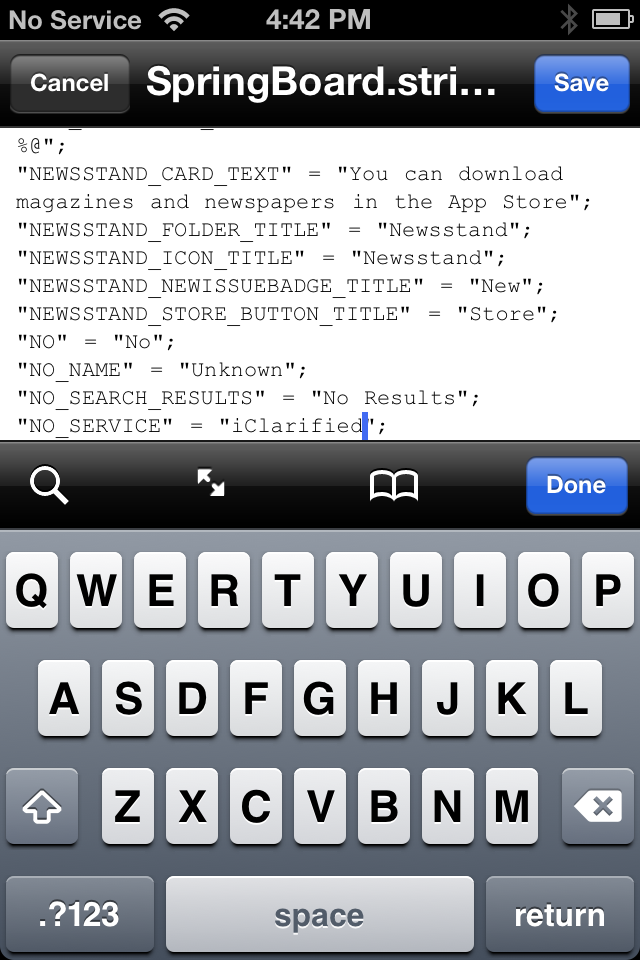
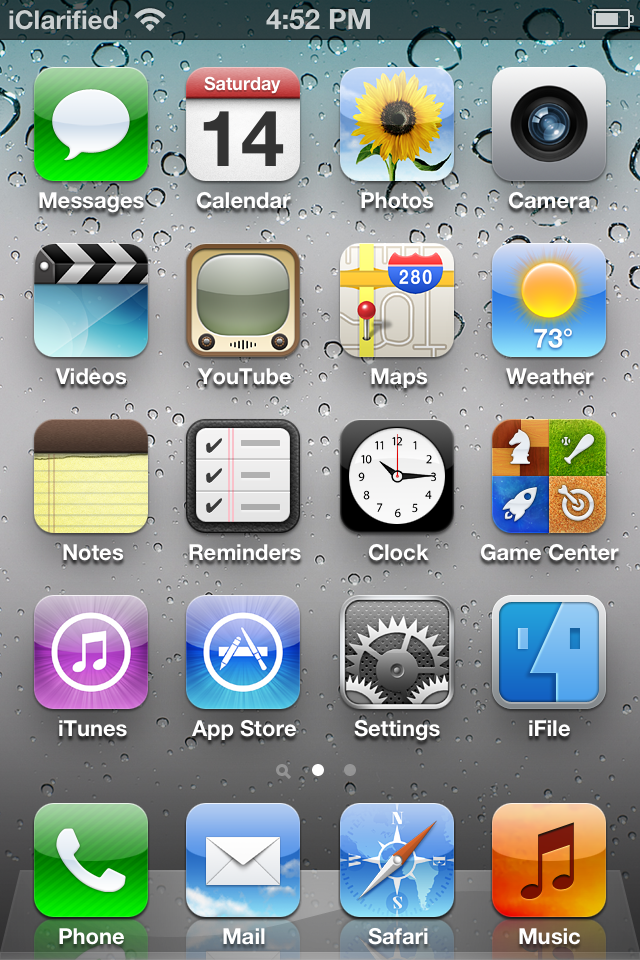
You may want to follow these instructions if you want to customize your SpringBoard. For example, you can change the status bar message 'No Service' to a string of your choice.

Step One
You will need to have jailbroken your device and installed iFile from Cydia.

Step Two
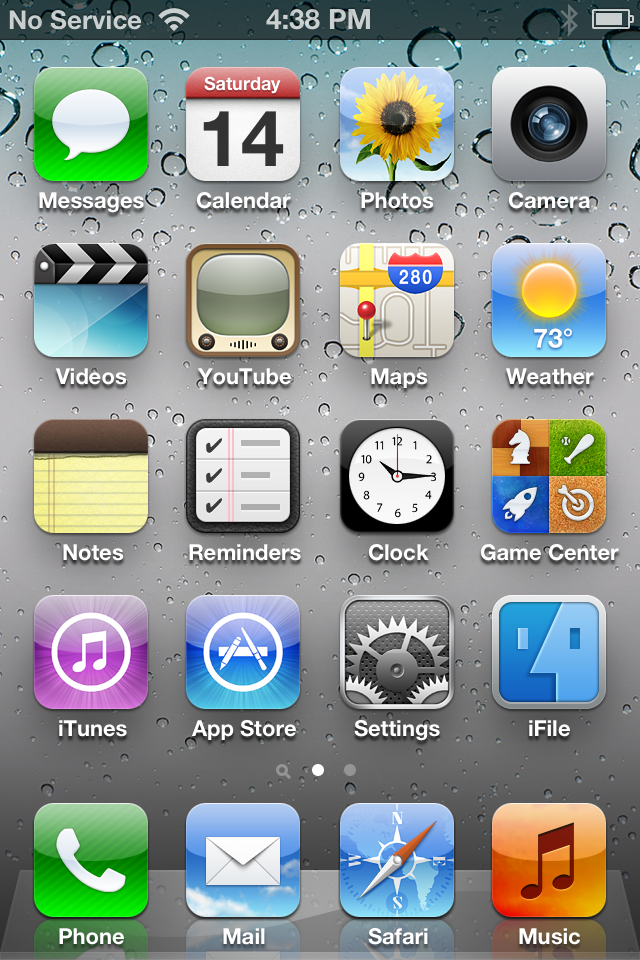
Launch iFile by tapping its icon on your SpringBoard.


Step Three
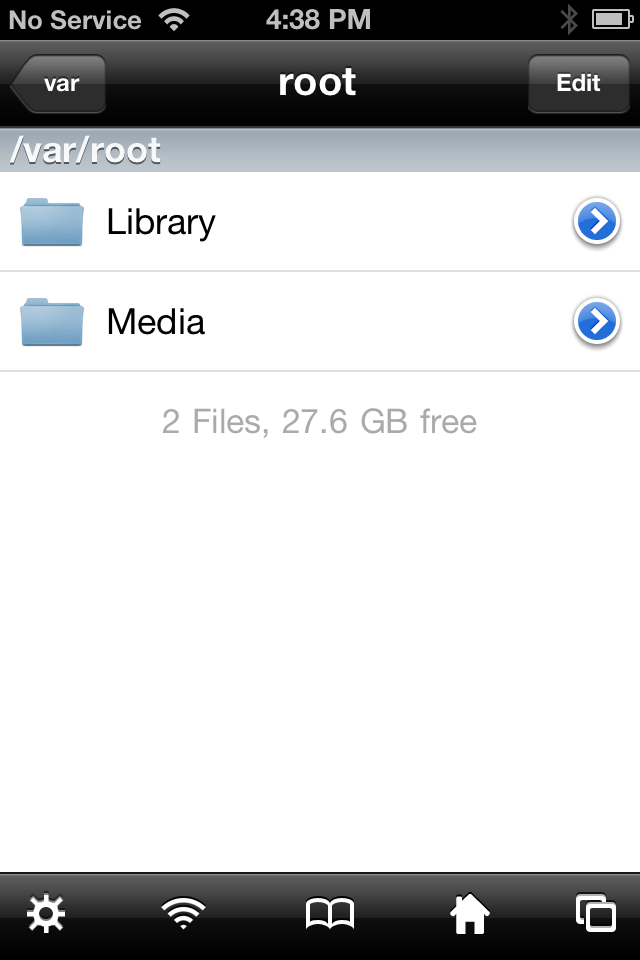
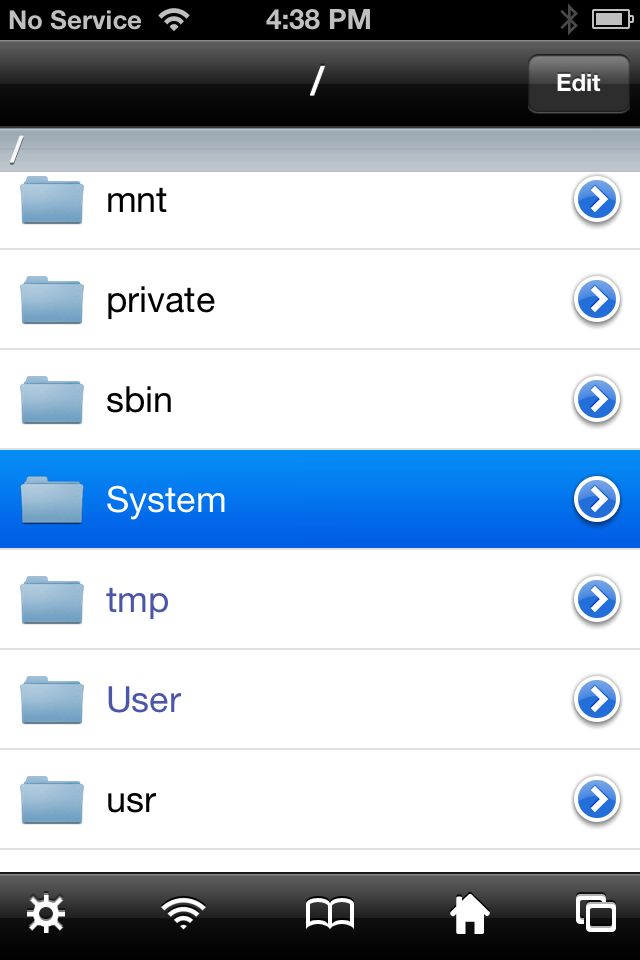
Press the back button until you get to the root directory of your device, then select System from the list of folders.


Step Four
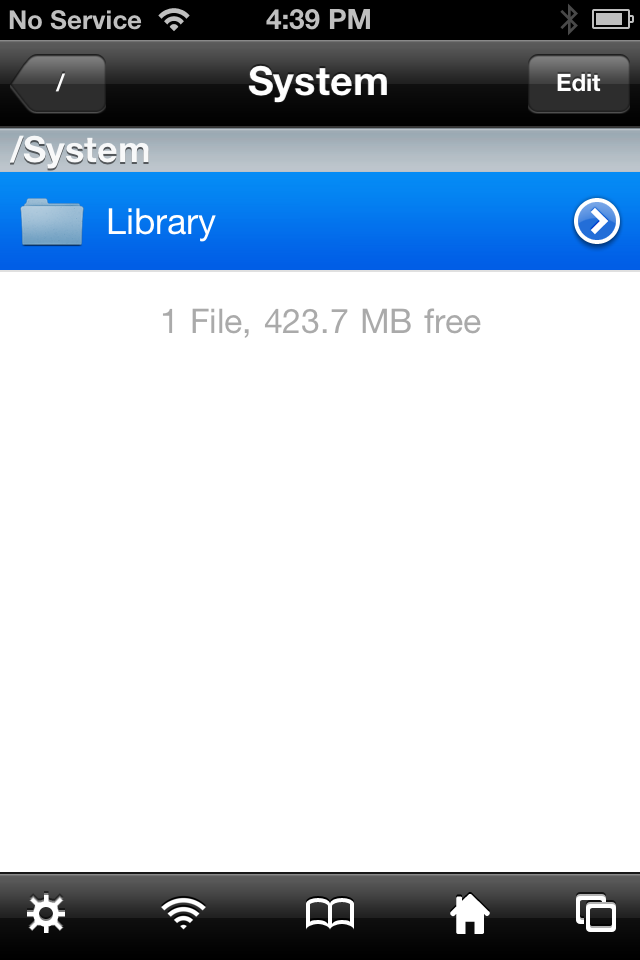
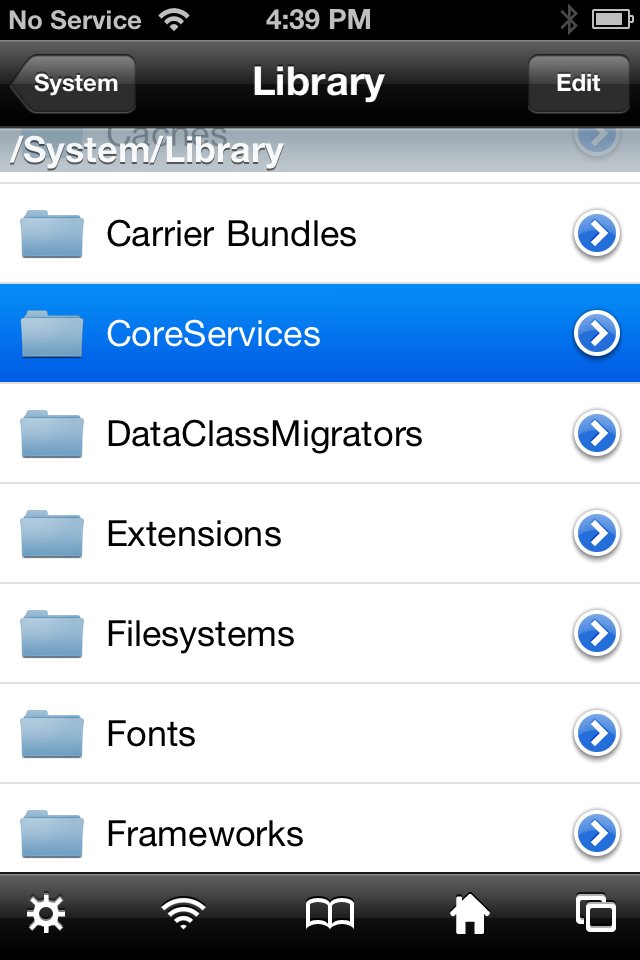
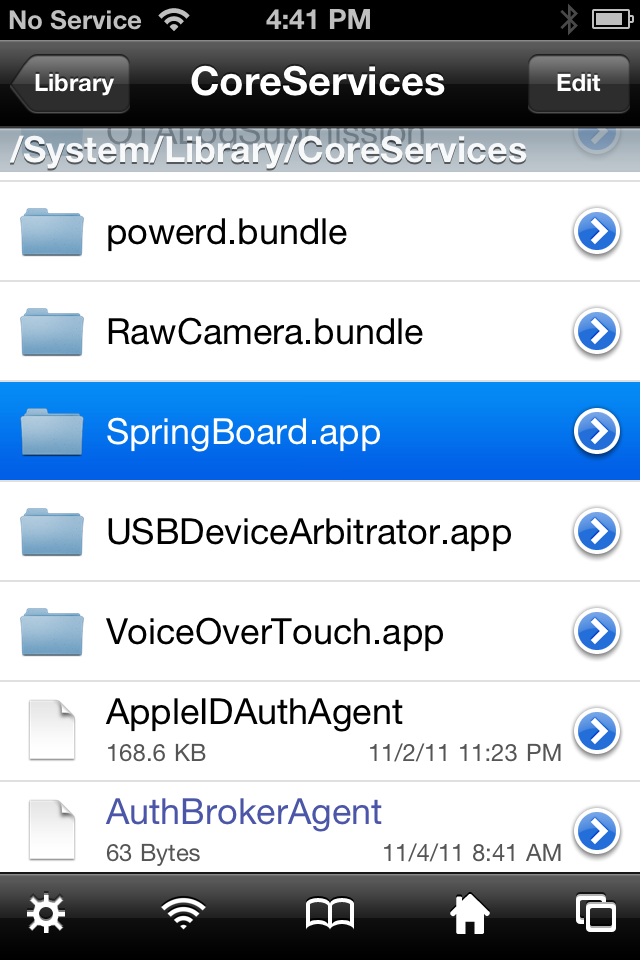
Press to select the Library folder then tap to select the CoreServices folder.


Step Five
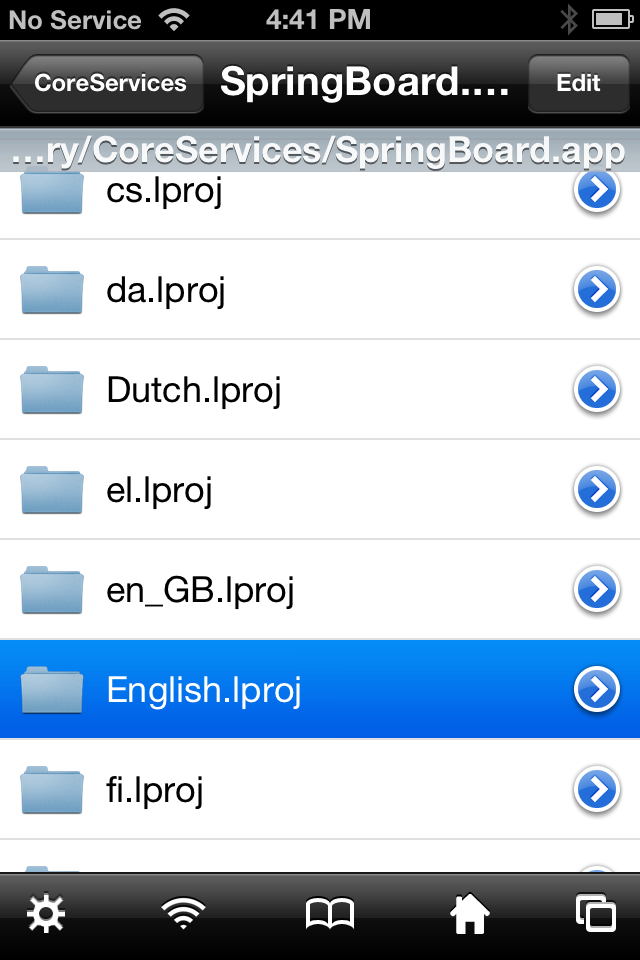
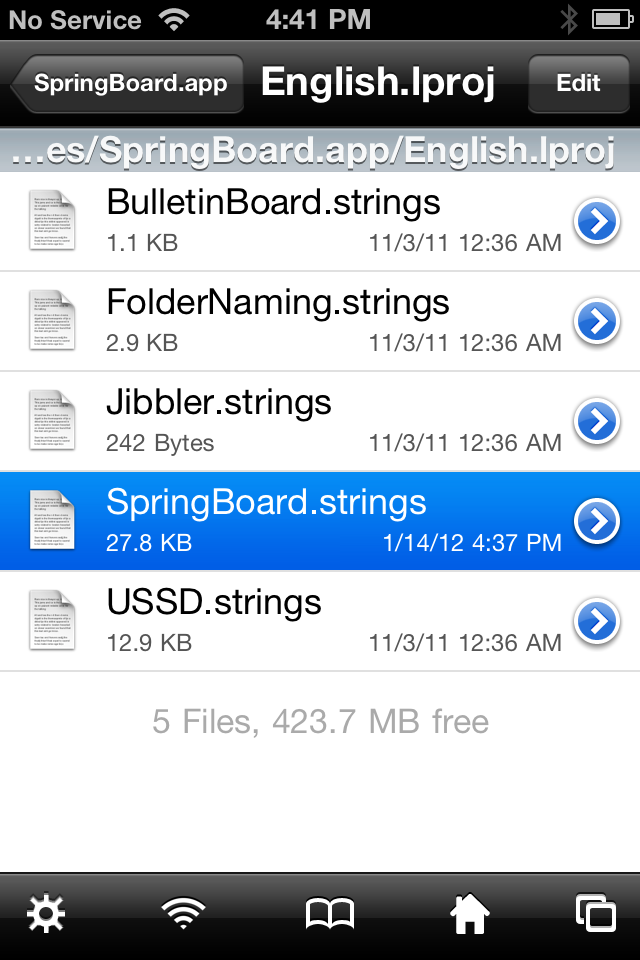
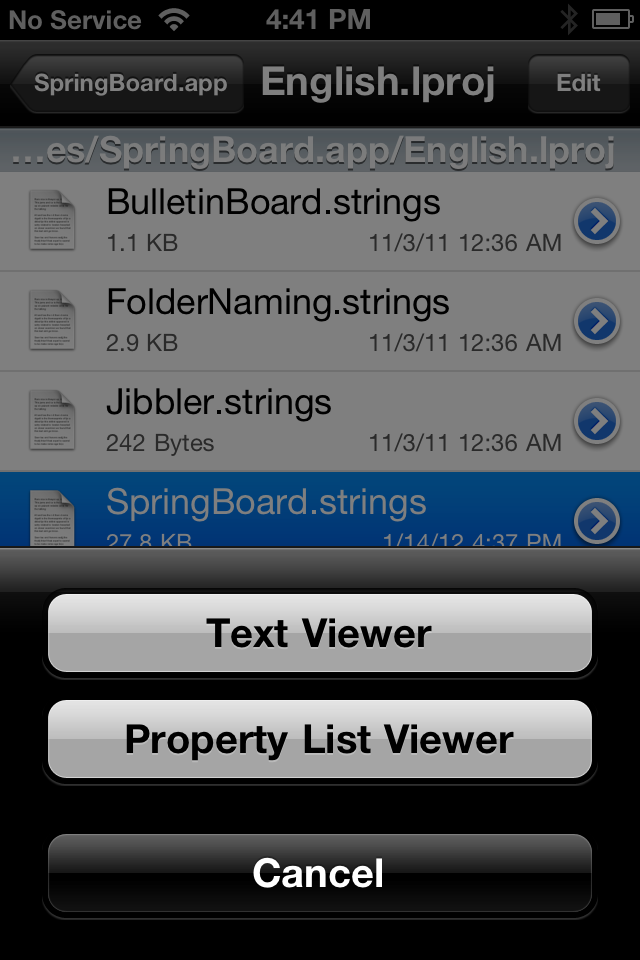
Tap to choose the SpringBoard.app folder then press to select the English.lproj folder.


Step Six
Press to select SpringBoard.strings then choose Text Viewer from the popup menu that appears.


Step Seven
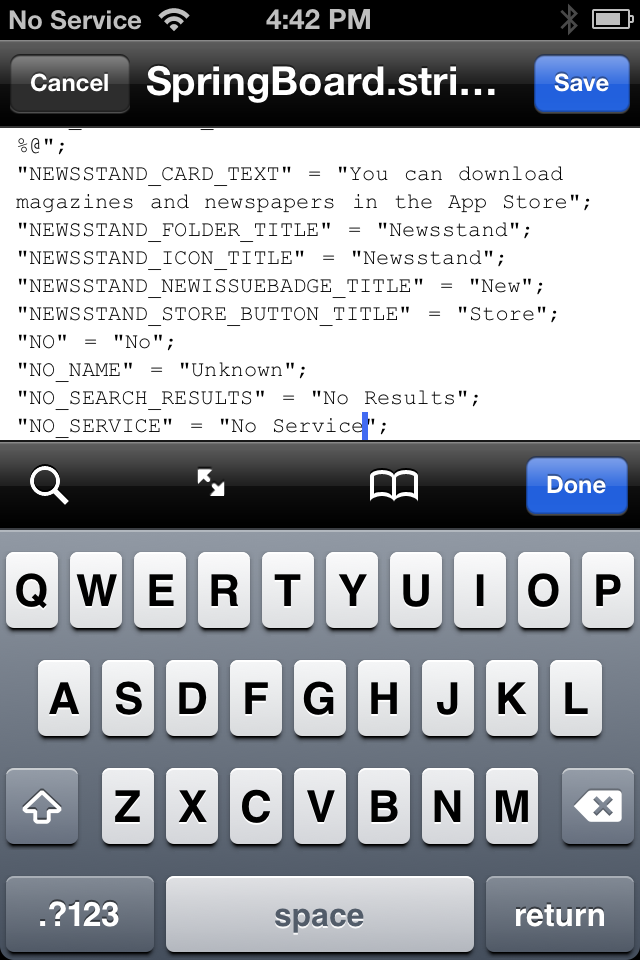
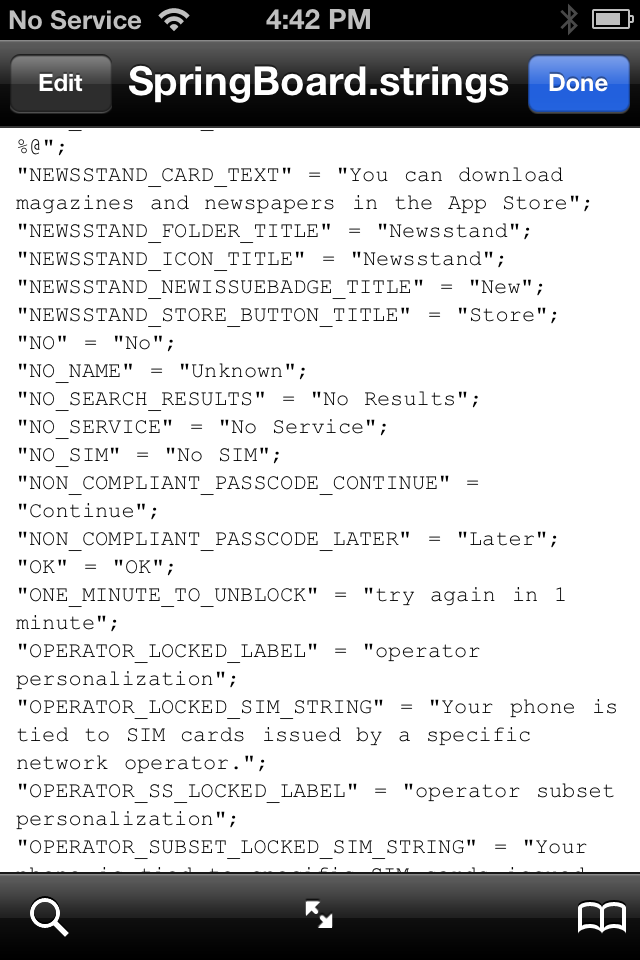
Navigate to the string you would like to customize then click the Edit button at the top left of the screen.


Step Eight
Change the value of the string variable to your liking then click the Save button.


Step Nine
You can now reboot your device for the changes to take effect!


Note: If you want to change the word to anything such as pop up message, just repeat the Step 7 again!
Be Aware: We are not respond on any circumstance!


You can like our Facebook page , add us to your circle on Google+ or follow us on Twitter to keep yourself updated on all the latest from any gadget product!
Monday, June 18, 2012

Downgrade Baseband 06.15 To 05.13.04 With Redsn0w 0.9.14b1

Well today iPhone Dev Team has just announced releasing a new version of Redsn0w which comes with some great features and bugs fixes. The new version is Redsn0w 0.9.14b1 which comes with an important feature and only for both iPhone 3G and 3GS users, the feature is it will allows you to downgrade  the baseband on the iPhone 3G(S).
This version of Redsn0w is very useful for those guys who are stuck on baseband 06.15 and right now and with Resdn0w 0.9.14b1 they will be able to downgrade  to 05.13.04. This will restore GPS functionality, as well as allow you to use stock IPSWs again. Full details after the break…
From the Dev Team’s release notes:
“The iPhone Dev Team is happy to announce a baseband downgrade option in redsn0w for those who are using the iPad’s o6.15 baseband on the iPhone3G or iPhone 3GS.
Typically you’d have the 06.15 baseband if you unlock with Ultrasn0w but updated your iPhone baseband past 05.13.04. With this new capability, you can now downgrade specifically from 06.15 to 05.13.04 (even if you never had 05.13.04 on that device before). This gives you the best of both worlds: ultrasn0w compatibility and a normal iPhone baseband with full GPS and the ability to use stock IPSWs again.
Here are the steps:

1. Use the “Extras=>Select IPSW” button in redsn0w to tell it which firmware version you have installed (new-bootrom 3GS users can usually skip this step but it doesn’t hurt for them to do it too).
2. Do a controlled shutdown of you  (“slide to power off”). This step is very important to avoid mount problems when the ramdisk is running!
3. Go back to the first screen and click “Jailbreak”. Enable the “Downgrade from iPad baseband” checkbox, disable Cydia if you already have it installed, and click Next to proceed through the normal DFU ramdisk steps.
After the ramdisk gets launched and you see the Pwnapple running on your iPhone, you’ll eventually get to the “Flashing Baseband” step. THIS STEP TAKES A VERY LONG TIME to complete and there won’t be any feedback while it’s running. Please just let it be for the next 3-8 minutes! When the ramdisk has done its job it will reboot the phone on its own.
For those who are wondering if you can update your 3G or 3GS to 06.15 solely for the purposes of downgrading to 05.13.04, the answer is “yes” for 3G owners, and “maybe” for 3GS owners. The iPad is not compatible with 3GS units manufactured week 34 of 2011 or later. If you have an iPhone 3GS and if digits 3-5 of its Serial Number are 134 or later (xx134…), then you should NOT try to install the 06.15 baseband on your 3GS! It will brick your radio, preventing both the downgrade from working and normal iPhone software from using it as a phone! Be warned!”
Really I think this is a great feature from the iPhone Dev Team… So here is the download links of Redsn0w 0.9.14b1 below:
  • Download Redsn0w 0.9.14b1 [Windows users]
  • Download Redsn0w 0.9.14b1 [Mac users]


You can like our Facebook page , add us to your circle on Google+ or follow us on Twitter to keep yourself updated on all the latest from any gadget product!
Friday, May 25, 2012

Download Absinthe 2.0 Untethered 5.1.1 Jailbreak

Download Absinthe 2.0 untethered jailbreak on iOS 5.1.1 for Windows / Mac is now finally here. As most of you know that Absinthe 2.0 jailbreak will support all iOS devices except Apple TV 3.


Absinthe 5.1.1 Untethered jailbreak will support below devices:
  • iPhone 3Gs
  • iPhone 4
  • iPhone 4 CDMA
  • iPhone 4S
  • iPad 1
  • iPad 2 Wifi
  • iPad 2 GSM
  • iPad 2 CDMA
  • iPad 2 Wifi, R2
  • iPad 3 Wifi
  • iPad 3 Global
  • iPad 3 CDMA
  • iPod 3G
  • iPod 4G
  • AppleTV 2


    Absinthe 5.1.1 untethered jailbreak has a user-friendly interface. When using Absinthe to jailbreak your iDevice you won’t need to put your iDevice in DFU mode. It will take 5 minutes to jailbreak your iDevice using Absinth 5.1.1 untethered jailbreak

    Download Absinthe 2.0 Untethered 5.1.1 Jailbreak [Direct Links] :

  • Download Absinthe 2.0 for Windows
  • Download Absinthe 2.0 for Mac
  • Download Absinthe 2.0 for Linux
Update: Download Absinth 2.0.1 From Here:

Absinthe 2.0.1 Greenpois0n  (Mac): Absinthe 2.0.1 MAC
Absinthe 2.0.1 Greenpois0n (Windows): Absinthe 2.0.1 Greenpois0n WINDOWS
Absinthe 2.0.1 Greenpois0n(Linux): Absinthe 2.0.1 GREENPOISON LINUX

How to jailbrak iOS 5.1.1


You can like our Facebook page , add us to your circle on Google+ or follow us on Twitter to keep yourself updated on all the latest from any gadget product!
Friday, April 20, 2012

Add Lock Screen Shortcuts With FastLock [Jailbreak Tweak]

FastLock for iPhone offer the exactly needed quick start actions to your lock screen. It’s a great tool for adding quick shortcuts on the lock screen. The new jailbreak tweak allows you to go directly to the task of your choice without having to go through the normally unmodified long taken process to start an action after being on lock screen.


fastlock
With this new jailbreak tweak called FastLock you will be able to go quickly to your desired action from your lock screen. It is basically one shortcut that provide you with a list of actions. By double tapping on your home button you will get this list of all different things you can do such as :
    • Place a call
    • Send a message
    • Send an email
    • Tweet
    • Add a contact
    • Add a note
    • Set an alarm or timer
    • Take a photo
The list was made based on the most common actions made by iPhone users after they unlock their devices. And what is even great about this app is that it looks fantastic. it have this transparent function, so whatever wallpaper you have on your home screen you will be able to see it as a background. The tweak don’t interfere with other apps you have installed so it works perfectly well with Stride
FastLock is available on  Cydia from the ModMyi repository for the price of $0.99 US.
More Information about this tweak :
Repo: ModMyi.com
Version: 0.1.0
Author: DjKira
Section: Tweaks
Identifier: com.snowstorm.fastlock
Maintainer: poetic_folly
Homepage: http://modmyi.com/info/fastlock.php
File Name: pool/main/c/com.snowstorm.fastlock/com.snowstorm.fastlock_0.1.0_iphoneos-arm.deb
Size: 295636 bytes

Watch The Video From iDB about FastLock Jailbreak Tweak:


You can like our Facebook page , add us to your circle on Google+ or follow us on Twitter to keep yourself updated on all the latest from any gadget product!
Saturday, February 18, 2012

Create Custom Zeppelin Logos [Jailbreak Tweak]

How customize your carrier logo with new Cydia tweak called Zeppelin on your device. Today we bring to you a full guide showing you how to create custom Zeppelin logos simply and correctly! But only for a new custom logos you want to put it in Zeppelin, first make sure you have installed Zeppelin Tweak from Cydia.

Zepelin logo

Here’s the simply and easiest steps to create your custom Zeppelin logos:

Step 1: you must be download DiskAid or iFunbox program for your mac or pc, and connect your device.
Zeppelin logo
Step 2: Go to root partition from file system and go to /Library/Zeppelin/.
Zeppelin logo

Step 3: Search for a good icon size or resize your icon (i have pixels 50×50) and make six copies for your image icon and be sure the extension PNG.
Zeppelin logo
Step 4: Rename your images icon as we showing you in our guide photo.
Zeppelin logo
Step 5: Put your images in a new folder, rename it and drag and drop it to Zeppelin.
Zeppelin logo

Finally refresh and you will be done, you can choice your custom logo in Zeppelin, ENGOY


Now you can find this tweak in Cydia and it is completely free!

You can like our Facebook page , add us to your circle on Google+ or follow us on Twitter to keep yourself updated on all the latest from any gadget product!
Sunday, February 12, 2012

Send Files From Your iPhone To Any Device Via Bluetooth Using AirBlue For iOS 5

One of the things we often take for granted from our mobile devices is the ability to quickly transfer files between any Bluetooth-capable devices. iOS doesn’t really play ball, though, leaving iPhone users to look for other means to share audio, video, and image files.
There have been a few attempts from Cydia purporting to allow Bluetooth file sharing, namely Celeste, which released last year. Unfortunately, not only did it not actually work particularly well, but it was limited to iOS devices only. What happened to universal sharing by default?
Well, enter AirBlue Sharing; the answer to the prayers of those looking to share files with local devices. Unlike Cesleste and the other solutions available, it gives you back your freedom by allowing you to send/receive from any Bluetooth device – even Android.
bluetooth_logo
Compatible with devices running iOS 4.2 through iOS 5.0.1, this great tweak requires no configuration whatsoever, and offers high speed Bluetooth transmission of up to 1.7 MB/s. It leaves no stone unturned in its quest for total sharing, allowing you to send directly from Notes, Photos, Videos, Music, Contacts or Voice Memos if you so choose.
Here are a couple of video of this great tweak in action:


The cost? Well, it comes in at a rather hefty $4.99, and is available in Cydia as we speak. Then again, it works well, and is probably the best solution for Bluetooth sharing.
bluedobex1
If you fancy giving AirBlue Sharing a go, head over to the BigBoss repository – a default in your list of Cydia sources unless you’ve opted to delete it – and make your purchase.
We’re loving it here at Redmond Pie, and cannot recommend it enough!
You will obviously need to jailbreak your device to install this tweak.

You can like our Facebook page , add us to your circle on Google+ or follow us on Twitter to keep yourself updated on all the latest from any gadget product!
Friday, February 10, 2012

Use Siri On iPhone 4 / iPad 2 Without Proxy Server With Sara (Jailbreak Tweak)

If still anyone of you wants Siri alternative for the old generation devices like iPhone 4, and iPad 2 without messing with any operating system and your home or business local networks to make anything working, then for surely you will like the new best alternative to Siri called Sara. We know there are already coupled of tweaks and services available in Cydia to bring Siri on your iPhone, iPad, such as Spire by the Chpwn. Spire is quite good, and works awesome if you have set up it properly but the installation of Spire on the local network is just out of mind for the simple skills having users and for those who have not ever heard the name of operating systems carrying the roots of Linux.

Many people argued around the social websites that they haven’t able to make Spire work on the local network and wants something ready to use services for their Spire installation on the device. However, here comes the Sara, after the development of months and testing it is finally available in the Cydia Store for free of cost, with aim to bring the Siri UI and much more working service on your device. Sara is available in the Cydia Store for free of cost, and it also works on iPad without playing any advanced settings on your device core. Sara is an alternative application, which adds a quick icon to your device dashboard, and allows you to run on your device with a single tap.

Sara also has the good-looking Siri user interface and much quick clean out of the interface than the Siri itself; the tweak is come up with coupled of great features and without any limitations on your device. Sara is appeared to beating Siri on the location-based services, as the Sara allows you to expand the location-based searches, and it won’t limit its services to the United States and Canada. In addition to this, Sara also has an ability to control your PC, switch couple of phone toggles, search for songs, built-in barcode reader, and even learns from its mistakes. The main and most useful feature of the Sara is you don’t need to set up any proxies to make it work on your device.
Sara The Siri Alternative

Sara is available on this repo “http://isoftjsc.com”, you can simply download it on your device without any hustle. Simply add this repo in your Cydia sources and search for “Sara 0.2” on your Cydia Store.


You can like our Facebook page , add us to your circle on Google+ or follow us on Twitter to keep yourself updated on all the latest from any gadget product!
Wednesday, February 8, 2012

Jepit Bring You Cool App Switching Effect (Jailbreak Tweak)

iOS has always had it’s smooth ways with navigating the UI. But it gets old for some people and they want a change. If that’s you, then we have the perfect tweak! It’s called Jepit and it adds a few really nice animations you can choose from for app switching. Not only that, but you can increase the speed of app switching as well.


From the first image, you can see all of the animation options. There’s quite a few to choose from and many of them look really cool. The whole interface of this tweak isn’t done very well. There’s lots of errors and hopefully the developer will get them worked out. Such as vertical and horizontal animations being switched up and the word “Horizontal” being spelled wrong. Other than that, this tweak works great! Just remember until there’s an update, horizontal is actually vertical and vise versa.
Additionally, you can change the speed of the animation as shown with the image to the right. Make sure you enable it and then set the speed in which you like best. Test them out first and make sure it’s the right one for you and the animation. Take into account that the “fade” option isn’t affected by the speed. You won’t see any change so just test them out.
Overall this tweaks functionality works like a charm, but the UI needs a bit of an upgrade. With this tweak being $1.59 in Cydia, do you think it’s worth it? All you need to do is to jailbreak your iOS device. You can use our guide posted here to jailbreak all A4 devices on iOS 5.0.1 and our guide posted here for A5 devices, i.e. the iPhone 4S and iPad 2. 

Note: We are IMeNu not recomment you to use it right due to many bugs from this tweak!


You can like our Facebook page , add us to your circle on Google+ or follow us on Twitter to keep yourself updated on all the latest from any gadget product!
Tuesday, February 7, 2012

Six Wonderful Jailbreak Tweak Recently Floated up

Here are the best jailbreak creations floated up recently, many are free.
1. RingerX VIP - $1.99
RingerX VIP is a jailbreak tweak made by fabled iOS developer Yllier that lets you have limitless customizations for whom and when your iPhone rings, vibrates, or remains silent. The settings are all found in the Contacts application after you install it and there is also the option to override the stock iOS settings so that RingerX VIP allows you to control everyone's ability to contact you depending on your mood. It includes a timer that can override the mute switch (pictured above) that lets you mute the iPhone for a duration of time. You can set settings per individual contact or via groups of contacts. You can also set a different tone for each contacts group. We think that this is a must-have for any iPhone owner.


2. MyAssistant - $0.99
MyAssistant is a jailbreak tweak by iOS developers Akhil Tolani and Andrea Olivia that lets you have more control over Siri. Maybe that isn't saying enough; this is like the Springtomize of Siri. It lets you customize what you want to say to Siri to activate system toggles, input your own questions to get custom responses to, use Siri as a voice method for invoking Activator actions, launch applications, enter commands, or even change the Siri user interface to make it look more personalized. It has had its fair share of bugs upon release, but the developers are working their behinds off to make it as perfect as possible. The idea behind MyAssistant makes it a great step up from other Siri tweaks, and the dollar price tag makes it even better.


3. Booksstand - $0.99
Booksstand is a new jailbreak tweak by iOS developer Nikos Lykousas that lets you move your iBooks files over to Newsstand so that you can actually give that new iOS 5 application a use after all! It has a very simple-to-use interface that you might expect Apple to have designed themselves. It puts a shortcut to the actual book from iBooks into Newsstand so that you can launch the book from Newsstand instead of iBooks while feeling like you are using Newsstand the way it was supposed to be used. Never again will you have to feel like you have a useless application on your SpringBoard that you have to hide to get out of your sight. It's speedy and such a great idea.


4. Zeppelin - FREE
Zeppelin is a jailbreak tweak released by iOS developer Alex Zielenski in order to help you have more customization with the iOS status bar. It comes pre-loaded with a ton of icons that you can make appear in your status bar in place of your carrier name or device name. The picture above basically shows you what it does, however there are more image packages being added to Cydia that are Zeppelin-compatible which you can also use. We think it's pretty cool how the icons dynamically change to the same colors that you would expect from the signal bars when you go from the home screen to an application like Settings where it goes from white to blue. There is an icon for everyone in this tweak.


5. ColoredKnob - FREE
ColoredKnob is a simple tweak that adds a bit of color to your unlock slider. It's free on Cydia for downlaod, and it has now updated with a host of new colors.


6. MusicBanners - FREE
MusicBanners is a jailbreak tweak developed by iOS developer and hacker Ryan Petrich that lets you have a notification banner appear just like any other notification when a new song begins playing on your iDevice. As you can see from the image included above, MusicBanners shows you the album artwork, the song name and the artist, and an icon to let you know that it's from the Music application. MusicBanners works with the stock Music application, Spotify, Grooveshark, and other music services.


via modmyi via idownloadblog


You can like our Facebook page , add us to your circle on Google+ or follow us on Twitter to keep yourself updated on all the latest from any gadget product!
Monday, January 23, 2012

Khmer Font For iOS 5.0/5.0.1 (.DEB)

 Here is the link to download Khmer Font for iDevice:

Khmer Font For: iPhone/iPod/iPad

KeyBoard For : iPhone/iPod

KeyBoard For : iPad

Note: Font must install first then keyboard!

Click Here to know more about how to install .deb into your iDevice!

Update:  New version is out 1.0.2

Here is Khmer Font for: iPhone

             Khmer Keyboard: iPhone

You can like our Facebook page , add us to your circle on Google+ or follow us on Twitter to keep yourself updated on all the latest from any gadget product!
Tuesday, December 27, 2011

HOW TO JAILBREAK 5.0.1 UNTETHERED WITHOUT BASEBAND UPDATE

You can quickly access, download & install Corona 5.0.1 Untether (Chronic Dev team’s version, packaged in the Cydia store) for your iPhone 4, iPhone 4 (CDMA), iPhone 3GS, iPad 1, iPod Touch 4G & iPod Touch 3G *CURRENTLY RUNNING iOS 5.0.1* by following the steps below:

Open the Cydia app on your tethered jailbroken device**
Search for “Corona”
Hit the “Install” button (as shown in the screen grab below)

This package will allow your 5.0.1 device to install pod2g’s untethered exploits and reboot without requiring an external tool like redsn0w or sn0wbreeze, and without having to restore your device (so you get to keep all your apps, contacts, etc).
**Note: if you do not currently have access to the Cydia store on your 5.0.1 device, you can use the redsn0w 0.9.10 tool developed by the iPhone Dev team. It is exactly the same set of files as our Cydia package, but bundled with redsn0w for new jailbreak users and/or those who are not already running a tethered jailbreak:
Important Note: iPhone users, if you rely on unlock you MUST stay away from iOS 5.0.1 update, it will break your unlock as it will upgrade your iPhone baseband to one that can’t be unlocked. Dev-team will release Redsn0w 0.9.9 to let unlockers able to upgrade to iOS 5 with preserving the unlockable basebands.
Jailbreak iOS 5.0.1 – Supported devices :
iPod touch 3G
iPod touch 4G
iPad 1
iPhone3GS
iPhone4 (GSM)
iPhone4 (CDMA)
iPhone 4S – ?
iPad 2 – ?

Jailbreak iOS 5.0.1 – iPhone 4, 3GS,iPod Touch 4G, 3G, iPad [Tutorial] :

HOW TO JAILBREAK 5.0.1 iPHONE 3GS UNTETHERED COMPLETE GUIDE:
1) Open RedSn0w tool and click “Extras” (Scroll down for link)
20111227-173837.jpg
2) Click “Custom IPSW”

JAILBREAK 5.0,5.1 iPHONE 3GS UNTETHERED COMPLETE GUIDE
3) Select original iOS 5.0.1 and click “Open”
JAILBREAK 5.0,5.1 iPHONE 3GS UNTETHERED COMPLETE GUIDE
4) Waiting ……
JAILBREAK 5.0,5.1 iPHONE 3GS UNTETHERED COMPLETE GUIDE
5) OK. Custom IPSW created
20111108-173334.jpg
6) Click “Pwned DFU”
JAILBREAK 5.0,5.1 iPHONE 3GS UNTETHERED COMPLETE GUIDE
7) Click “Next” and read information
JAILBREAK 5.0,5.1 iPHONE 3GS UNTETHERED COMPLETE GUIDE
8) OK. Your device should now be in owned DFU mode…
JAILBREAK 5.0,5.1 iPHONE 3GS UNTETHERED COMPLETE GUIDE
9) Connect iPhone 3GS with iTUNES and click “OK”
JAILBREAK 5.0,5.1 iPHONE 3GS UNTETHERED COMPLETE GUIDE
10) ATTENTION. Click “ALT +Restore” ( Mac OS X) or “CTRL + Restore” ( Windows PC)
JAILBREAK 5.0,5.1 iPHONE 3GS UNTETHERED COMPLETE GUIDE
11) Select Custom IPSW (file “NO_BB……..” )
JAILBREAK 5.0,5.1 iPHONE 3GS UNTETHERED COMPLETE GUIDE
12) Click “Restore”
JAILBREAK 5.0,5.1 iPHONE 3GS UNTETHERED COMPLETE GUIDE
13) Waiting….
JAILBREAK 5.0,5.1 iPHONE 3GS UNTETHERED COMPLETE GUIDE
14) Waiting…. and Done.
Windows LINK
Mac LINK
… Jailbreak iOS 5 on iPhone 4, 3GS, iPod Touch 4G, 3G and iPad
If you have one of the A4 devices listed above and are not using iOS 5.0.1 yet, you can update your iOS version now (though you should not update to 5.0.2 when it is released, or you will lose your jailbreak) or you can wait a few days max for our Corona 5.0 Untether package, which will be available in the Cydia store upon release.
Apologies to those of you iPad 2 & iPhone 4S users who are waiting for an A5 jailbreak; we all (pod2g + everyone here at Chronic Dev) are still working feverishly ‘round the clock to get an untethered jailbreak into your hands as well, just as soon as we possibly can.


You can like our Facebook page , add us to your circle on Google+ or follow us on Twitter to keep yourself updated on all the latest from any gadget product!
Wednesday, December 14, 2011

Who Is The Winner? REDSN0W 1.0 OR GREENPOIS0N RC 7?


Untethered jailbreak 5.x coming soon. Who is the winner? RedSn0w from iPhone Dev Team or GreenPois0n RC7 from Chronic Dev Team.

MuscleNerd (RedSn0w)
Only a 2-3 day ago , popular hacker and iPhone Dev Team brain member MuscleNerd tweeted that a new upcoming update to the Redsn0w 1.0 will make both TinyUmbrella blob and Cydia blobs saves useful for iOS 5.0+ . This is a great news for the downgraders.
But…
Pod2G (GreenPois0n):
Today I succeed in jailbreaking my iPod 3G. The exploit is user-land, rely on a user ROP payload and a kernel write anywhere exploit.
I can’t give much details right now, but here are the next steps :
- upgrade the iPod 3G to iOS 5.0.1
- do the same on iPhone 4 / iOS 5.0.1
- then iPad 1 & iPod 4G
At every step, the exploit code needs certainly to be reworked, but I really don’t know right now. Next, I’ll return to the research for iPad 2 and iPhone 4S. I don’t know if I gonna release first for other devices or not. I’ve to think about it. Feel free to give your opinion.
We’ll keep you up to date with news on pod2g’s progress.
WHO IS THE WINNER?